
If you search for the best smart home devices for Airbnb, most guides give you the same list: a smart lock, a thermostat, maybe a doorbell camera, and a noise monitor. Pick any four from column A, add them to your property, and you’re done.
The problem is that most of those lists are written for simplicity, not for reliability at a real short-term rental.
The best smart home devices for Airbnb hosts are a smart lock, smart thermostat, water shutoff valve, leak sensors, smart switches, and a reliable smart hub. Start with guest access, energy management, and water protection before adding convenience devices like lighting, TV controls, cameras, or specialty sensors.
This guide covers every major device category with specific recommendations, explains what to avoid and why, and — most importantly — explains how these devices work together as a rental operating system rather than as isolated gadgets.
A lock that does not know your booking calendar is still a manual process. A thermostat that does not reset between guests wastes money and creates comfort issues. A water valve that never changes based on occupancy does not protect the property when it is vacant.
The difference between a smart home setup that saves you time and one that creates more work is almost always the same thing: booking-aware automation.
For the full picture on how automation fits together, see our Ultimate Guide to Short-Term Rental Automation.
At-a-Glance: Our Recommended Airbnb Smart Home Stack
- Smart lock: Yale Assure Lock 2 with Z-Wave Plus — reliable keypad-first access with strong automation support.
- Water damage prevention: Zooz Titan Water Valve — motorized main water shutoff for vacancy protection.
- Smart thermostat: ecobee Smart Thermostat Essential — strong balance of guest usability, limits, and automation support.
- Lighting: Eve Energy Light Switch or other hard-wired smart switches — guest-proof lighting automation without relying on smart bulbs.
- Smart hub: Aeotec Smart Home Hub Gen 3 — SmartThings-compatible hub with Z-Wave, Zigbee, Matter, Thread, and Wi-Fi support.
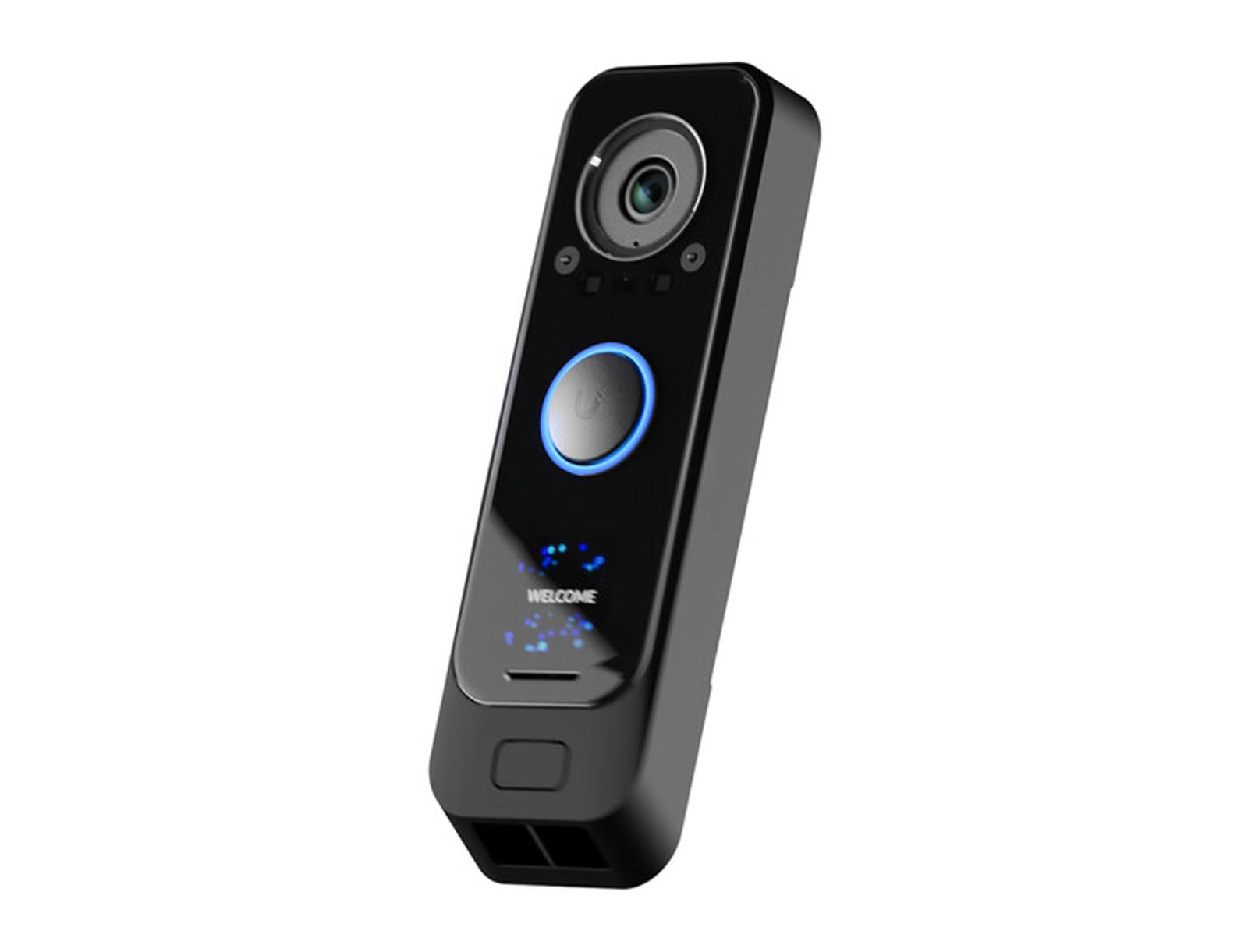
- Entry camera: UniFi Doorbell Pro — one clearly disclosed exterior entry camera, used responsibly.
- Optional TV/streaming: Google TV Streamer — simple remote, clean interface, and fewer TV-related guest support calls.
Why this stack works: it is guest-proof, operationally useful, and built around the actual problems short-term rental hosts deal with: self check-in, energy waste, water damage, vacancy protection, cleaner access, and remote monitoring.
What Airbnb Hosts Should Automate First
Not every smart device deserves equal priority. Hosts usually get the best return by automating the parts of the rental that create operational risk or repetitive manual work.
| Priority | Device Category | Why It Matters |
|---|---|---|
| 1 | Smart lock | Enables self check-in, unique guest codes, cleaner access, and remote access control. |
| 2 | Smart thermostat | Reduces energy waste while keeping the property comfortable before arrival. |
| 3 | Water shutoff valve | Protects the property from major water damage during vacancies. |
| 4 | Leak sensors | Alerts you to water problems in high-risk areas before they become disasters. |
| 5 | Smart switches | Automates exterior, arrival, and vacancy lighting without confusing guests. |
| 6 | Smart hub | Improves reliability by supporting Z-Wave, Zigbee, Thread, and local device networks. |
| 7 | Doorbell camera | Provides entry visibility when allowed, properly disclosed, and used only outside. |
| 8 | TV and specialty devices | Useful for guest experience, but lower priority than access, energy, and property protection. |
The goal is not to make your Airbnb feel like a futuristic smart home. The goal is to make the property easier to operate, easier for guests to use, and less likely to surprise you with an expensive problem.
How We Evaluate Smart Devices for Airbnb
Most smart home device reviews evaluate products the way a homeowner would. That is the wrong lens for short-term rentals.
A homeowner usually cares about convenience, voice assistants, routines, and novelty. A short-term rental host cares about reliability, guest-proof design, remote management, battery life, platform compatibility, and whether the device creates fewer support calls instead of more.
The best Airbnb smart home devices score well on four criteria.
Reliability under heavy use. A residential smart lock might be used a few times per day. An Airbnb lock can be used dozens of times on a turnover day by guests, cleaners, maintenance workers, and owners. STR devices need to tolerate more frequent use, more impatient users, and more edge cases.
Guest-proof design. Anything that requires guests to download an app, connect over Bluetooth, understand an automation system, or learn a non-standard interface will eventually create support calls. Physical keypads, wall switches, standard thermostats, and simple remotes survive guest interaction far better than clever tech that only works under ideal conditions.
Independence from guest Wi-Fi. Your guests are using your internet. Their phones, laptops, streaming devices, tablets, and game consoles are all competing on the same network. Core rental systems should not depend entirely on the guest Wi-Fi network when better options exist. This is why Z-Wave, Zigbee, and Thread devices are often better fits than Wi-Fi-only devices for locks, sensors, switches, and valves.
Automation compatibility. A device is only truly useful in a rental if it can respond to reservation timing. The best devices are not just remote-controlled. They can be coordinated around check-in, checkout, cleaner access, owner stays, maintenance windows, and vacancy periods.
That is the difference between a smart home and an automated rental.
For a broader look at the automation side, see our guide to calendar-based rental automation.
1. Smart Locks — The Foundation of Every STR Setup
A smart lock is the single most important smart home device for most Airbnb properties. It enables self check-in, eliminates physical key handoffs, supports cleaner and maintenance access, and allows you to control who can enter the property without being on-site.
But a smart lock by itself is not lock automation.
A lock is only the hardware. The operational value comes from how access codes are created, scheduled, monitored, and removed.
What to look for in an Airbnb smart lock:
- A physical keypad with backlit buttons.
- Support for many unique access codes.
- Z-Wave support when possible for battery life and reliability.
- A physical key backup for true lockout situations.
- A guest-friendly interface that does not require an app.
- Compatibility with your automation platform.
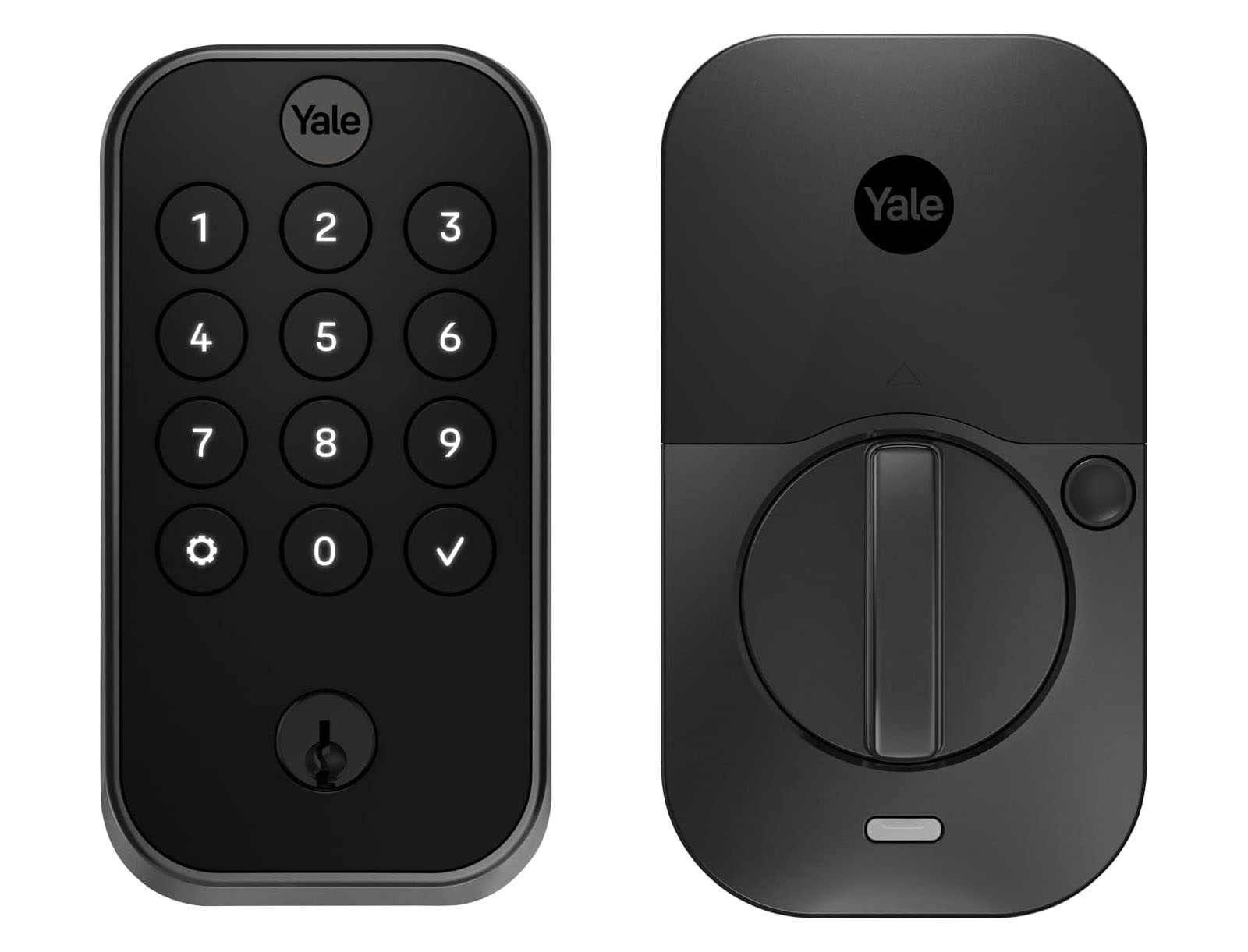
Top pick: Yale Assure Lock 2 with Z-Wave Plus
The Yale Assure Lock 2 is our top smart lock recommendation for short-term rentals because it gets the basics right. It has a clean keypad, a strong physical design, broad platform support, and a Z-Wave option that is better suited to rental automation than most Wi-Fi-only locks.
For a deeper breakdown, see our full article on why the Yale Assure 2 is the best smart lock for short-term rentals.
What to avoid: app-only locks, Bluetooth-only locks, fingerprint-first locks, and consumer locks that are designed around owner convenience rather than guest reliability.
Bluetooth is not useful for remote management. App-only locks create unnecessary guest friction. Fingerprint readers can be sensitive to dirt, moisture, cold weather, and inconsistent use. Those features may be fun at home, but they are not the foundation of a dependable STR access system.
The automation angle: without booking-calendar automation, someone still has to create the guest code, set the access window, remove the code after checkout, and manage cleaner or maintenance codes separately.
At one property, that might be manageable. Across multiple units, it becomes a constant admin task.
For the full lock automation strategy, read Rental Lock Automation: The Smart Way to Secure Your Short-Term Rental.
For protocol selection, see our guide to the best smart lock technology for Airbnb in 2026.
2. Smart Water Shutoff + Leak Sensors — Your Highest-ROI Upgrade
Water damage is one of the most expensive avoidable disasters in a short-term rental.
Most hosts think about locks and thermostats first. Water protection is usually an afterthought — until a supply line, toilet, water heater, washing machine, or frozen pipe causes thousands of dollars in damage while nobody is at the property.
A smart water shutoff valve is one of the highest-ROI smart devices you can install because it protects the property when the property is most vulnerable: during vacancy.
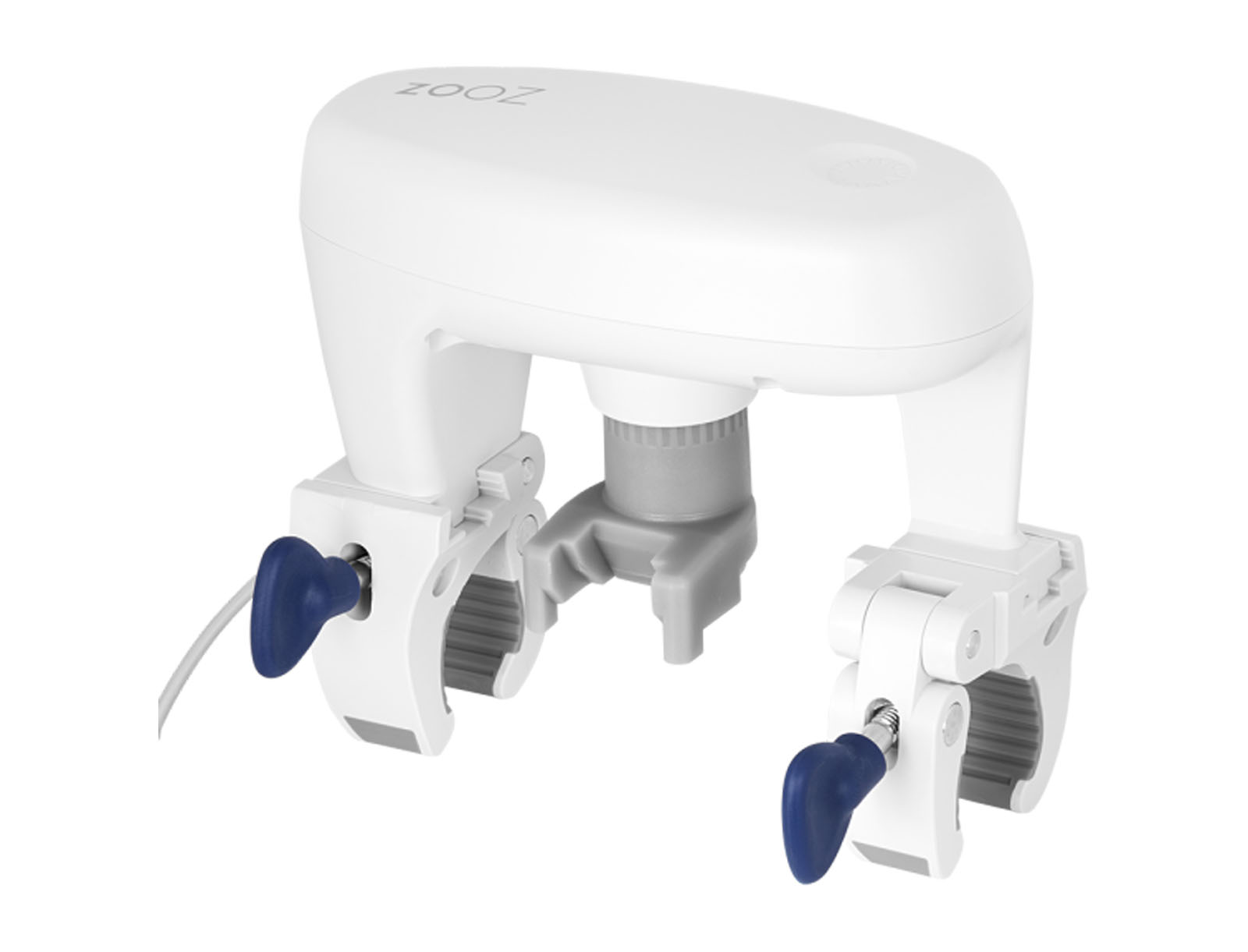
Top pick: Zooz Titan Water Valve
The Zooz Titan is our preferred water shutoff device because it is a motorized actuator that can control an existing quarter-turn ball valve without requiring an expensive plumbing overhaul. For STR use, that matters. You want a durable, serviceable, reliable shutoff solution that can be automated around occupancy.
The STR-specific risk pattern: water disasters are especially dangerous when a property is vacant between stays. Nobody is there to notice the slow leak under a sink, the toilet that keeps running, the washing machine hose that fails, or the water heater issue that starts on day one of a four-day gap.
The solution is not to wait until a leak sensor detects water. The better rental strategy is to shut off the water automatically at checkout and turn it back on before check-in.
That is why water valve automation is different from generic leak detection.
Recommended water protection setup:
- A smart shutoff valve on the main water supply line.
- Leak sensors under sinks, near water heaters, near washing machines, and around other high-risk areas.
- Calendar-aware automation to shut water off during vacancies.
- Alerts for leak sensors, low battery, device offline status, and temperature risks.
Important note on leak sensor automation: we do not recommend blindly configuring leak sensors to shut off the water during guest stays. A false alarm or minor sensor issue could cut water to guests while they are showering, cooking, or getting ready to leave. That is a terrible guest experience and a likely review problem.
Use leak sensors for alerts. Use calendar-based automation for routine vacancy shutoff.
For the full strategy, read Water Valve Automation: Protect Your Short-Term Rental From Costly Water Damage.
For sensor-specific guidance, see Leak Sensors for Short-Term Rentals: Why Water Monitoring Is Non-Negotiable.
3. Smart Thermostats — Comfort + Cost Control

A smart thermostat is one of the best smart home devices for Airbnb energy management — when it is set up correctly.
The key phrase is “set up correctly.”
A thermostat that lets guests run the heat at 85°F or the air conditioning at 60°F wastes money. A thermostat that aggressively drops into an energy-saving mode while guests are sleeping creates comfort complaints. A thermostat designed to “learn” one household’s behavior can behave unpredictably when a different guest checks in every few days.
Short-term rental thermostat automation is not about learning a family’s routine. It is about managing occupancy.
What to look for in an Airbnb smart thermostat:
- Remote access.
- Guest-friendly physical controls.
- Temperature limits or heating/cooling ranges.
- Reliable scheduling.
- Automation platform compatibility.
- Clear behavior during occupancy, vacancy, and pre-arrival periods.
Top pick: ecobee Smart Thermostat Essential
The ecobee Smart Thermostat Essential is our top pick for most short-term rentals because it has a clean guest-facing interface, strong app control, broad ecosystem support, and a more predictable schedule-and-limits approach than learning-first thermostats.
ecobee’s thermostat lineup is also easier to compare across tiers if you are choosing between Essential, Enhanced, and Premium models. See ecobee’s thermostat comparison for official product differences.
What to avoid: learning-first thermostat behavior that tries to infer occupancy patterns from inconsistent guest use. Nest thermostats can work in some rentals, but they require more careful setup because the “learning” features are designed for homes with stable occupants, not properties with rotating guests.
For most Airbnb hosts, predictable control beats clever automation.
The automation angle: the thermostat should behave differently before check-in, during the stay, after checkout, during vacancy, and during owner stays. That means the booking calendar should drive thermostat behavior.
For a deeper strategy article, read Thermostat Automation: A Smart Move for Short-Term Rentals.
For product comparisons, see our guide to the best smart thermostat for Airbnb hosts.
For setup guidance, see How to Restrict Thermostat Changes at Your Short-Term Rental.
4. Smart Light Switches — Guest-Proof Lighting That Actually Works

Smart bulbs are one of the most common lighting mistakes Airbnb hosts make.
They are cheap, easy to install, and stop working reliably the moment a guest physically turns off the wall switch — which guests will do, because that is what wall switches are for.
For short-term rentals, smart switches are usually better than smart bulbs.
When the switch is smart, the wall switch still works normally for guests while you retain automation and remote control. When the bulb is smart, the entire setup depends on guests not using the switch the way they have used switches their entire lives.
What to use instead:
- Smart wall switches for main lighting circuits.
- Smart dimmers where dimming is useful and intuitive.
- Smart plugs for lamps, floor fans, and plug-in comfort devices.
- Hard-wired solutions for exterior and pathway lighting.
Top picks:
- Eve Light Switch — Thread-based wall switch for guest-facing circuits.
- Eve Energy Smart Plug — useful for lamps and plug-in devices.
- Zooz ZEN71 On/Off Switch — a strong Z-Wave option for many lighting circuits.
- Zooz ZEN30 Double Switch — useful where you want fan/light or dual-load control.
What works well with automation: exterior lights, porch lights, pathway lighting, entry lighting, and welcome lighting all respond well to sunset-based and booking-calendar-based automation.
Interior lighting tied to check-in and checkout can improve guest experience without making the property feel complicated. A simple arrival scene — entry light on, porch light on, hallway light on — is often more valuable than a house full of smart bulbs.
For the full strategy, read Lighting Automation for Short-Term Rentals.
5. Network and Connectivity — The Infrastructure Everything Depends On
The hub is not the most exciting smart home device, but it is one of the most important parts of a reliable short-term rental setup.
Many consumer smart home guides push Wi-Fi devices because they are easy to understand: connect the device to Wi-Fi, download the app, and you are done. That works for a handful of convenience devices at home. It does not always work well for rental operations.
Short-term rentals need more reliable device networks because the property’s internet is shared with guests, streaming devices, phones, laptops, tablets, and sometimes neighboring Wi-Fi congestion.
A dedicated smart home hub lets you use better device protocols for the right jobs:
- Z-Wave: excellent for locks, valves, switches, and many rental-critical devices.
- Zigbee: useful for sensors, plugs, and affordable device ecosystems.
- Thread: promising for newer Matter-over-Thread devices.
- Matter: useful where supported, but still inconsistent for some rental-critical features.
- Wi-Fi: still fine for cameras, thermostats, streamers, and some app-based devices.
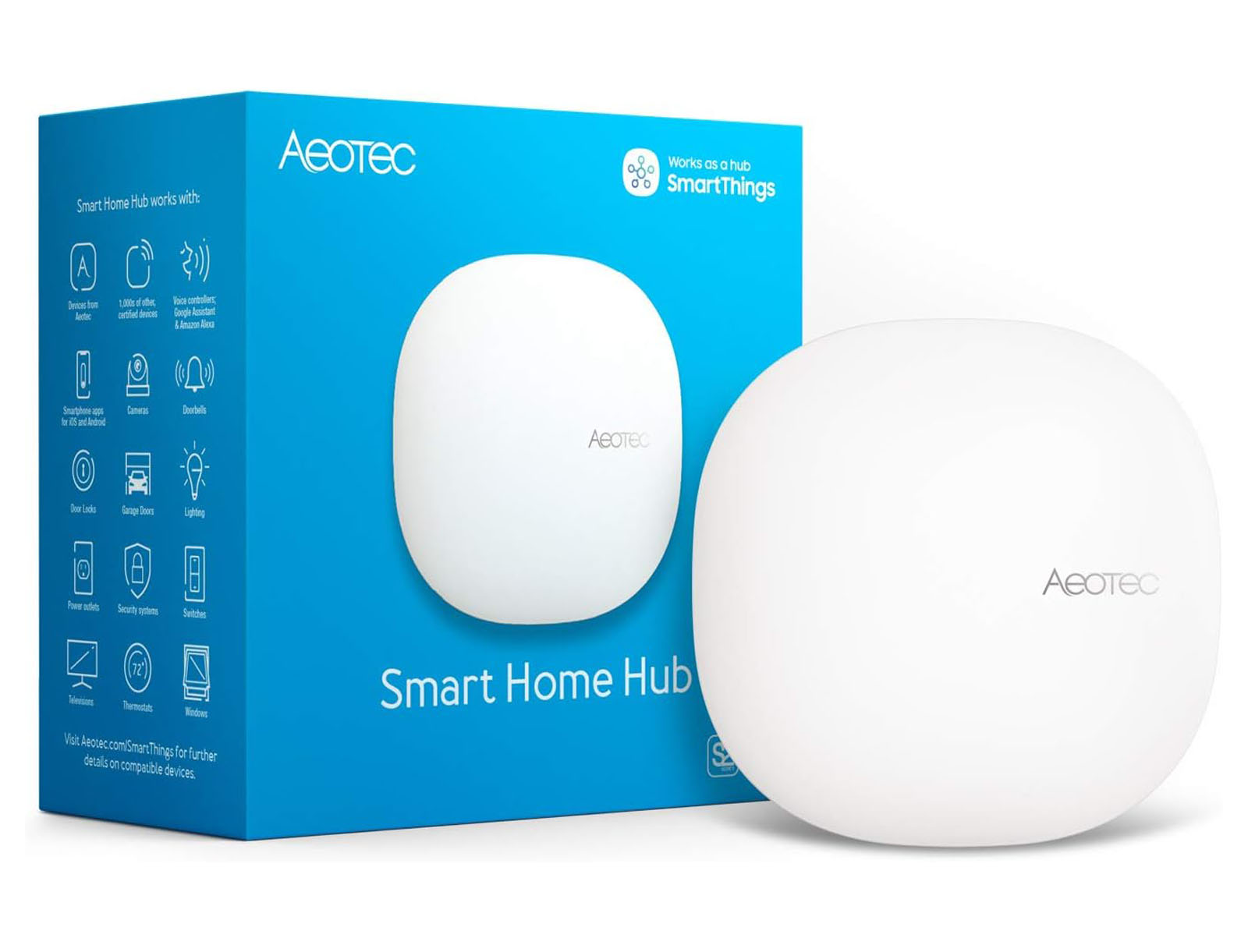
Top pick: Aeotec Smart Home Hub Gen 3
The Aeotec Smart Home Hub Gen 3 is still one of the most useful hub choices for STR hosts because it works with SmartThings and supports multiple protocols in one ecosystem. Aeotec describes the hub as supporting Zigbee, Z-Wave, Matter, Thread, and Wi-Fi, which makes it a flexible foundation for mixed-device rental setups.
For platform strategy, read Why SmartThings Is the Best Smart Home Platform for Your Airbnb.
For protocol decisions, read What Is the Best Smart Home Automation Protocol?.
For network planning, see Why Internet Quality Matters More Than Ever in 2026 and Why Smart Home Devices Shouldn’t Compete With Guest Wi-Fi.
6. Outdoor Security Cameras — One Rule, No Exceptions
Outdoor cameras can be useful at short-term rentals, but they must be handled carefully.
There is one rule that matters more than any device recommendation: never install cameras or recording devices inside guest spaces.
Interior cameras create privacy issues, platform policy issues, and guest trust issues. They are not worth it.
Exterior cameras can be useful when they are clearly disclosed, positioned appropriately, and used for security rather than guest surveillance.
Good exterior camera use cases:
- Monitoring the main entry door.
- Confirming cleaner or maintenance arrival.
- Deterring unauthorized parties.
- Checking whether guests are struggling to find the entrance.
- Documenting package deliveries or obvious exterior issues.
Top pick: UniFi Doorbell Pro
A single doorbell camera at the main entrance is usually the cleanest setup. It gives you useful exterior visibility without creating the privacy concerns that come with cameras around patios, hot tubs, pools, or interior spaces.
Airbnb’s current policy prohibits security cameras and recording devices that monitor indoor spaces, even if turned off. Airbnb allows exterior cameras, noise decibel monitors, and smart devices only when they comply with Airbnb’s rules, disclosure requirements, and applicable law. You can review Airbnb’s policy here: Restrictions on security cameras and other devices in homes.
What to avoid: indoor cameras, hidden cameras, cameras pointed at private outdoor areas, undisclosed cameras, or overly aggressive monitoring that makes guests feel watched.
7. TV, Streaming, and Guest Convenience Devices
TV-related support calls are surprisingly common at short-term rentals.
Guests cannot find the right input. They log into their own streaming accounts and forget to log out. The remote is missing batteries. The TV interface is different from what they use at home. The cable box, TV, and streaming device all have separate remotes.
This is not the most important smart home category, but it can improve the guest experience if you keep it simple.
Top pick: Google TV Streamer
The goal is not to build a complicated entertainment system. The goal is to make the TV easy enough that guests do not need to message you.
Best practices:
- Use one primary streaming interface.
- Label remotes and inputs clearly.
- Provide an accessible HDMI cable for guests who bring their own device.
- Avoid complicated universal remote setups.
- Make checkout instructions clear for guest account sign-out.
For setup guidance, read Tips to Eliminate TV-Related Calls at Your Short-Term Rental.
8. Contact Sensors, Motion Sensors, and Specialty Devices
Contact sensors, motion sensors, smart plugs, relays, and specialty devices can be useful, but they should come after the core stack.
These devices are best when they solve a specific operational problem:
- A contact sensor confirms whether a closet, owner cabinet, or utility room was opened.
- A motion sensor can help trigger arrival lighting in the right location.
- A smart plug can control a lamp, floor fan, or plug-in comfort device.
- A relay can automate specialty systems like water heaters, well pumps, or heated floors when installed appropriately.
- A cabinet lock can protect owner storage or supplies.
These devices should not be added randomly. Every sensor should have a job.
Good supporting options include:
- ThirdReality Zigbee Contact Sensor
- ThirdReality Wireless Motion Sensor
- ThirdReality Smart Plug Gen2
- Yale Smart Cabinet Lock
- Zooz ZEN55 DC Signal Sensor
For a broader device library, browse our Recommended Devices and Device Reviews.
What Smart Home Devices Should Airbnb Hosts Avoid?
Some devices look appealing on paper but create more trouble than they are worth in a short-term rental.
App-only devices. Guests should not need to download an app to use basic property functions. Apps are fine for owners and managers, not for core guest access.
Bluetooth-only locks. Bluetooth range is too limited for remote management, and Bluetooth-first access creates unnecessary guest friction.
Smart bulbs as the main lighting strategy. Guests will turn off the wall switch. Once they do, the bulb is no longer smart.
Indoor cameras. Do not install them. They create privacy, policy, and trust issues.
Overly clever thermostats. Features designed to learn a family’s habits can behave poorly in a rental with rotating guests.
Cheap Wi-Fi devices for critical systems. Wi-Fi can be fine for some devices, but core systems like locks, valves, sensors, and switches often benefit from Z-Wave, Zigbee, or Thread.
Aqara-style ecosystem lock-in for core rental operations. Aqara devices can be interesting, but we do not recommend building your rental operation around an ecosystem that is too dependent on one brand’s hub, app, and compatibility decisions. For more context, read our Aqara Smart Home Ecosystem Review.
The Stack That Actually Works Together
The best Airbnb smart home setup is not a pile of gadgets. It is a system.
Here is what that system should do:
- Create guest lock codes before check-in.
- Expire guest lock codes after checkout.
- Allow cleaner and maintenance access without sharing guest codes.
- Pre-condition the thermostat before guests arrive.
- Reset HVAC settings after checkout.
- Shut off water during vacancies.
- Turn water back on before guests arrive.
- Control exterior and arrival lighting automatically.
- Alert you when important devices go offline.
- Alert you about water leaks, low batteries, and temperature problems.
- Scale across multiple units without creating daily admin work.
That is the real standard.
A smart lock, thermostat, valve, sensor, switch, and hub are all useful individually. But they become much more valuable when the booking calendar tells them what to do.
The Gap No Device List Addresses
Most “best smart home devices for Airbnb” articles stop at the purchase decision.
They tell you what to buy, but not how to operate it.
That is the gap that matters.
Buying a smart lock does not automatically create guest codes. Installing a thermostat does not automatically manage check-in and checkout comfort. Replacing a water valve does not automatically protect the property during vacancies. Buying sensors does not automatically tell you which alerts matter and which ones can wait.
The missing layer is rental-aware automation.
That means your booking calendar becomes the source of truth for the property. When a reservation changes, the devices adjust. When checkout happens, the property resets. When a guest extends a stay, the lock code, thermostat schedule, water valve, and other automations should stay aligned.
This is what separates a smart home from an automated short-term rental.
For a deeper explanation, read Why Most Smart Home Platforms Avoid Calendar-Based Automation.
How Rental Home Automator Turns Smart Devices Into a Rental System
Rental Home Automator exists because short-term rentals are not normal smart homes.
A normal smart home is organized around the people who live there. A short-term rental is organized around reservations.
That means your devices should not just respond to manual app commands. They should respond to check-in, checkout, cleaner access, owner stays, maintenance windows, vacancies, and calendar changes.
Rental Home Automator connects your booking calendar across Airbnb, Vrbo, direct bookings, PMS calendars, and Google Calendar to the smart devices in your property.
With the right devices connected, RHA can help you:
- Generate guest lock codes based on reservation timing.
- Remove or expire codes after checkout.
- Manage shared cleaner, maintenance, and owner codes.
- Adjust thermostats around guest arrival and departure.
- Turn water valves on and off based on occupancy.
- Run lighting automations around check-in, checkout, and vacancy.
- Monitor device status, battery levels, temperatures, and alerts.
- Manage multiple units, shared entry locks, and combined-unit rentals.
That is the real value of smart home devices for Airbnb hosts. Not just remote control. Not just another app. A connected operating system for the rental.
Explore the related RHA features:
Frequently Asked Questions
What smart devices should I install first in an Airbnb?
Most Airbnb hosts should start with a smart lock, smart thermostat, and water shutoff valve. Those three devices solve the biggest operational problems: guest access, energy management, and property protection. After that, add leak sensors, smart switches, a smart hub, and exterior cameras or noise monitors only where they solve a specific problem.
What is the most important smart home device for Airbnb hosts?
A smart lock is usually the most important first device because it directly affects check-in, guest access, cleaner access, and remote management. But a smart lock is only truly useful when access codes are automatically scheduled around reservations.
Are Wi-Fi smart devices good for Airbnb properties?
Wi-Fi smart devices can be fine for cameras, thermostats, streamers, and some plug-in devices. But for rental-critical systems like locks, valves, switches, and sensors, Z-Wave, Zigbee, or Thread often provide better reliability because they do not rely entirely on the same Wi-Fi network guests are using.
Should Airbnb hosts use smart bulbs or smart switches?
Smart switches are usually better than smart bulbs for short-term rentals. Guests naturally use wall switches. If a guest turns off the wall switch, a smart bulb loses power and stops responding. A smart switch keeps the guest experience normal while preserving automation and remote control.
Is a smart lock enough to automate Airbnb guest access?
No. A smart lock gives you the hardware, but automation requires code scheduling, reservation timing, cleaner access, maintenance access, code removal, and monitoring. Without calendar-connected automation, someone still has to manage codes manually before and after each stay.
Do Airbnb smart devices need to connect to the booking calendar?
They do if you want true rental automation. The booking calendar should drive guest codes, thermostat settings, water valve schedules, lighting behavior, and vacancy routines. Otherwise, your devices are smart, but your rental process is still manual.
What smart home devices should Airbnb hosts avoid?
Avoid app-only guest access, Bluetooth-only locks, indoor cameras, smart bulbs as the main lighting strategy, overly clever learning thermostats, and cheap Wi-Fi-only devices for critical systems. In a rental, predictable and reliable usually beats clever and flashy.
Are outdoor cameras allowed at Airbnb properties?
Outdoor cameras may be allowed when they follow Airbnb’s rules, local laws, and disclosure requirements. Indoor cameras and recording devices that monitor indoor spaces are not allowed by Airbnb, even if they are turned off. Always review current Airbnb policy before installing or listing any camera or monitoring device.
Are noise monitors allowed in Airbnb properties?
Noise decibel monitors may be allowed when they only measure sound levels and duration, do not record audio, are properly disclosed, and are not placed in bedrooms, bathrooms, or sleeping areas. They should be used as a party-prevention and neighbor-protection tool, not as a surveillance device.
Final Recommendation
The best smart home devices for Airbnb hosts are the devices that reduce operational risk and repetitive work.
Start with the core stack:
- Smart lock for guest access.
- Smart thermostat for comfort and energy management.
- Water shutoff valve for vacancy protection.
- Leak sensors for high-risk areas.
- Smart switches for guest-proof lighting.
- Smart hub for reliable device communication.
- Exterior camera or noise monitor only when appropriate and properly disclosed.
Then connect those devices to your booking calendar.
That is where the real value appears. A smart device you control manually is convenient. A smart device that automatically responds to each reservation is operational leverage.
Ready to Turn These Devices Into a Rental Automation System?
Smart devices are only the first step. Rental Home Automator connects your locks, thermostats, water valves, lights, and sensors to your booking calendar so your property automatically adjusts around check-in, checkout, cleaner access, owner stays, and vacancies.
For individual device deep-dives, browse our full library of smart device reviews and recommendations.
)
&description=&image=https://www.rentalhomeautomator.com/wp-content/uploads/hosting_rentalhomeautomator_com_files/2024/11/jens-kreuter-ngMtsE5r9eI-unsplash.jpg)